Why Your Drone Video Keeps Freezing — 7 Causes and How to Fix Them
If the picture on your controller keeps locking up, breaking into blocks, or dropping out for half a second, this article is for you. We'll walk through the causes in plain language, with real-world examples and no technical jargon. In 90% of cases, by the time you finish reading you'll know what to do.
First, the big misconception
A lot of operators reason like this: "the video is freezing, so something must be wrong with the antennas." Or: "I need a new drone / a better antenna / a bigger amplifier." And they start spending money on hardware when the problem is usually somewhere else entirely.
In reality, drone video is the end product of a dozen systems working at once — the radio link, the codec, the firmware, the physical conditions of the flight, the drone's onboard electronics, the weather. When you see a freeze, it could have originated at any one of those levels.
The good news: there aren't hundreds of causes. In practice, seven scenarios cover it. Let's take them one at a time.
Cause 1. Flying too low at long range
This is far and away the most common cause of freezing we run into.
Picture yourself talking to a friend over a two-way radio, standing in an open field. Crystal clear. Now crouch down behind a fence. What changed? There are obstacles between you now — the fence, the bushes, the lie of the ground. Part of the signal bounces off them, part gets through, and the voice starts to smear.
It works exactly the same way with a drone. What runs between your mast antenna and the aircraft isn't a line, it's a corridor — a radio wave propagates as a tube, not a thread. That tube is called the Fresnel zone. Keep it clear and the link is flawless. Let it clip the ground, trees or buildings, and the trouble starts.
The lower the drone flies at long range, the more often that tube scrapes the ground. You get multiple reflections, wave phases stack on top of each other — and the video starts to jump. Meanwhile your controller is showing full signal strength, because there's plenty of RF energy arriving. It's just arriving as a jumble.
What to do:
- If the mission allows it, fly higher. At 5 km, a safe altitude is 100 m or above. At 10 km, 150 m or above.
- Get your antennas as high as you can. On a 6 m mast at 5 km, the Fresnel zone is already being cut into by the ground whenever the drone flies low. On a 12–15 m mast, the link tube stays clear.
This is physics, and no amount of better hardware gets around it. Neither the stock antenna nor an expensive external system will make a radio wave travel through a hill.
Cause 2. Multipath propagation
This is an extension of the first cause, except it bites you even at a decent altitude.
Imagine standing in a large hall and hearing an echo. You speak, and the sound travels straight to the person you're talking to — but it also bounces off the ceiling, the walls, the floor. The same voice reaches their ear several times over, each copy offset in time. In a big hall you hear that as an echo; in an ordinary room, as a slight smearing of the sound.
Radio between the drone and the antenna behaves identically. If what's underneath the drone is flat water, an open field, a concrete apron, a hangar roof — the signal reflects. Your antenna receives the direct signal and its echo at the same time. The waves add together, sometimes reinforcing each other, sometimes partially cancelling out. And the pattern keeps shifting, because the drone is moving.
What it looks like in practice:
- The video locks up for half a second to a second, over and over
- Signal quality on the controller looks perfectly fine
- It's at its worst over water, wet concrete, asphalt and rooftops
What to do:
- If you're flying over a reflective surface, climb.
- Get the antennas up to the highest position available to you.
- If you have the option, switch to horizontal polarisation — it often helps over water.
Cause 3. A noisy RF environment on 2.4 GHz / 5.8 GHz
Imagine trying to hold a conversation in a crowded market with dozens of people talking around you. Someone five metres away will hear you fine. At twenty metres, your voice drowns in the general noise.
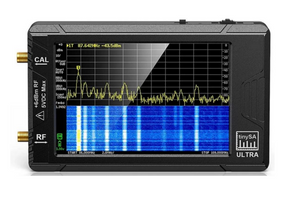
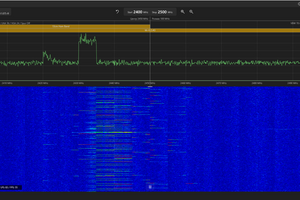
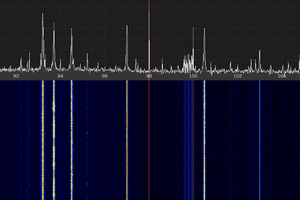
That's the situation on 2.4 GHz and 5.8 GHz along the line of contact. Practically everything lives in these bands: DJI drones first and foremost, EW systems (2.4 GHz coverage is the bare minimum these days), roughly 80% of all FPV, Starlink Wi-Fi routers, wireless headsets, other UAVs. If your drone runs on 2.4 or 5.8 GHz, it has to squeeze through all of that noise.
At short range — up to 1–2 km — you won't notice. But past 5 km your signal sinks to the level of the background noise, and the video starts freezing.
How to tell it's noise:
- In Signal Info on the controller: RSSI is high but RSRP is low. That means "plenty of power on the air, but very little of it is useful signal."
- The video only freezes in built-up areas.
- Things get sharply worse once you're 5+ km out.
What to do:
- If your drone supports multiple frequencies, move to 5.2 or 5.8 GHz for short missions — there's less clutter up there.
- For long range you need a drone that supports the lower bands (800 MHz, 1.4 GHz), which are far quieter.
- If you're running an antenna system, make sure it isn't 2.4 GHz only but covers several bands.
Cause 4. Enemy EW
In combat conditions this is a frequent scenario. EW (electronic warfare) equipment is purpose-built to generate interference on the frequencies drones use, and jamming on 2.4 GHz is the most common case of all.
How to tell EW apart from an ordinary noisy environment:
- Everything went bad suddenly at one specific point on the route, while conditions elsewhere are normal.
- RSSI spiked upward, RSRP dropped.
- The drone switched bands on its own (if it's capable of that).
- Operators nearby are reporting link problems too.
What to do:
- If your drone can hop between bands automatically, let it. Don't try to force it to stay on a particular frequency.
- If your drone is 2.4 GHz only, it's time to think about a different aircraft or an antenna system with broader frequency coverage.
- Bring the drone back and plan the route around the active EW zone.
Wood Station for Autel operates across six bands at once (including 800–900 MHz and 1.4 GHz), and Wood Station for DJI supports three. So when EW jams 2.4 GHz, the system automatically drops to the lower bands, where enemy equipment usually isn't present. Wood Station Vampire runs on 2.4 GHz but with far more output power (80 W EIRP), which is enough to punch through moderate jamming.
Cause 5. Antennas mounted too low
If everything else checks out — flat terrain, the drone is high, the air is clean — and the video is still freezing, check the height your antennas are mounted at.
Picture yourself on a beach, looking at a ship on the horizon. On your knees, all you see is the funnel. Standing at full height, you see the whole ship. From a lighthouse, you see ships tens of kilometres out. Mast-mounted antennas work on exactly the same principle.
The higher the antennas, the:
- Less ground-level noise reaches them
- Better the line of sight to the drone
- Wider the clear Fresnel zone
- Fewer the reflections off the terrain
On a 2–3 m mast, the RF environment around the antennas is far dirtier than it is at 12–15 m. It's simple physics — up there, ground-based interference barely reaches you; down at ground level, it's sitting right next to you.
What to do:
- 6 metres is the minimum that gives you anything. Better than stock antennas, but nowhere near the system's full potential.
- 12–15 metres is the sweet spot. Clear Fresnel zone, less noise, and the range finally opens up.
- Point the antennas along the flight direction — not just wherever they happened to end up.
Cause 6. The state of the drone itself: vibration, twin packs, worn props
This is the cause people forget about. The drone's own condition has a direct effect on signal quality.
Here's how it works. Inside the drone is a stack of electronics: the radio transmitter, the video codec, the motor controller, the ESCs, the GPS module. All of them generate electrical noise while running. Normally that noise stays within spec and doesn't interfere with the radio link.
But load the drone beyond spec and the noise climbs. Specifically:
- A "twin pack" — a doubled-capacity battery. More load on the motors, more current drawn, and the ESCs throw off stronger electromagnetic noise. That noise couples straight into the drone's own RF path.
- Worn or cracked propellers. They generate excess vibration, which affects both the IMU (the stabilisation system) and the electronics.
- A failing motor. One motor running at the wrong RPM means the flight controller is constantly compensating, and the load on the electronics goes up.
- An overloaded drone. Extra payload produces the same noise problem as a twin pack.
What the operator sees:
- Everything's fine on the stock battery; on the twin pack it freezes.
- In a hover you can hear uneven motor RPM and feel vibration.
- The video degrades specifically during manoeuvres, not in level flight.
What to do:
- Fly on stock batteries. If you need more range, the answer isn't a bigger battery — it's a more efficient radio link.
- Check your props regularly. Even a hairline crack means replacement.
- Full service on the drone every 50 flight hours.
Cause 7. A degraded controller
This one applies mainly to Autel and DJI units used with external antennas. A common operator mistake: pulling the stock antennas off and fitting pigtails from an antenna system while the controller is powered on. Or the reverse — connecting antennas with the controller already running.
Inside the controller is sensitive RF electronics: input amplifiers (LNAs) and filters, all designed to work with antennas attached. Remove an antenna hot and, for a brief moment, the amplifier input sits there with no load. That can burn out the amplifier outright, or quietly degrade its performance.
From the outside the controller looks fine. It powers up and establishes a link on the stock whip antennas at short range. But at long range, through an external antenna system, it won't hold the link — because the input stages are damaged.
Nine times out of ten the operator concludes "it's the antennas" and buys a better system. The problem was in the controller all along.
What to do:
- Always power the controller off before touching the antenna connectors.
- If you suspect degradation, test the controller with stock antennas at 3–5 km with the drone at 100+ m. If it still won't hold, the controller needs repair.
- When connecting to an external antenna system, use only the manufacturer's own pigtails.
Still freezing after all of that?
If you've worked through all seven causes and the freezes continue, there are a few more technical possibilities, but they're rare: a damaged pigtail, a faulty antenna cable, firmware issues. Those cases call for proper diagnostics using the Signal Info parameters, and often for replacing specific components.
In upcoming articles we'll cover:
- How to read Signal Info parameters and understand what they're telling you
- Antenna mast height: why 6 metres isn't enough and 12–15 is
- How to test your antenna system properly
The short version: what to do right now
If your video is freezing, run down this list:
- Is the drone flying high or low for the distance involved?
- Are there reflective surfaces underneath it — water, concrete, rooftops?
- What frequency is the link on, and how noisy is the air in that area?
- Is enemy EW known to be active in the flight zone?
- How high are the antennas mounted?
- What condition is the drone in — stock battery, props intact, service done?
- Has anyone touched the controller's antenna connectors without powering it down first?
In the overwhelming majority of cases, the answer to one of these questions is your problem.
If you fly an Autel EVO Max, a DJI Mavic / Matrice, or a Vampire UAV, and you keep running into freezes at long range, in a noisy RF environment, or inside an EW footprint, a Wood Station antenna system can substantially improve link stability. Wood Station OAK / OWL is the fit for DJI, Wood Station Autel for Autel, and Wood Station Vampire for Vampire. All three models are in service with units today and have proven themselves in real combat conditions.